Avantra 26 Release Notes
8 June 2026
What's new
Avantra 26 (version 26.6) introduces a new release model with two tracks, so you can choose between stability and early access to new features:
- Long-term support (LTS) releases, such as Avantra 26, are released twice a year and supported for 18 months with critical bug fixes and security patches. Each LTS release bundles the features delivered through the fast-ring since the previous LTS and comes with its own documentation set. LTS versions use a full version number in the form
26.y.x. - Fast-ring releases deliver new features, beta features, and fixes as soon as they are ready. They are numbered by calendar year, in the form
<year>.<release>.0- for example, 26.1.0 and 26.2.0. We're targeting the end of 2026 for fast-ring release to be broadly available.
For what this means for support and upgrade paths, see the Avantra release and support model.
Read on for the new features in Avantra 26.
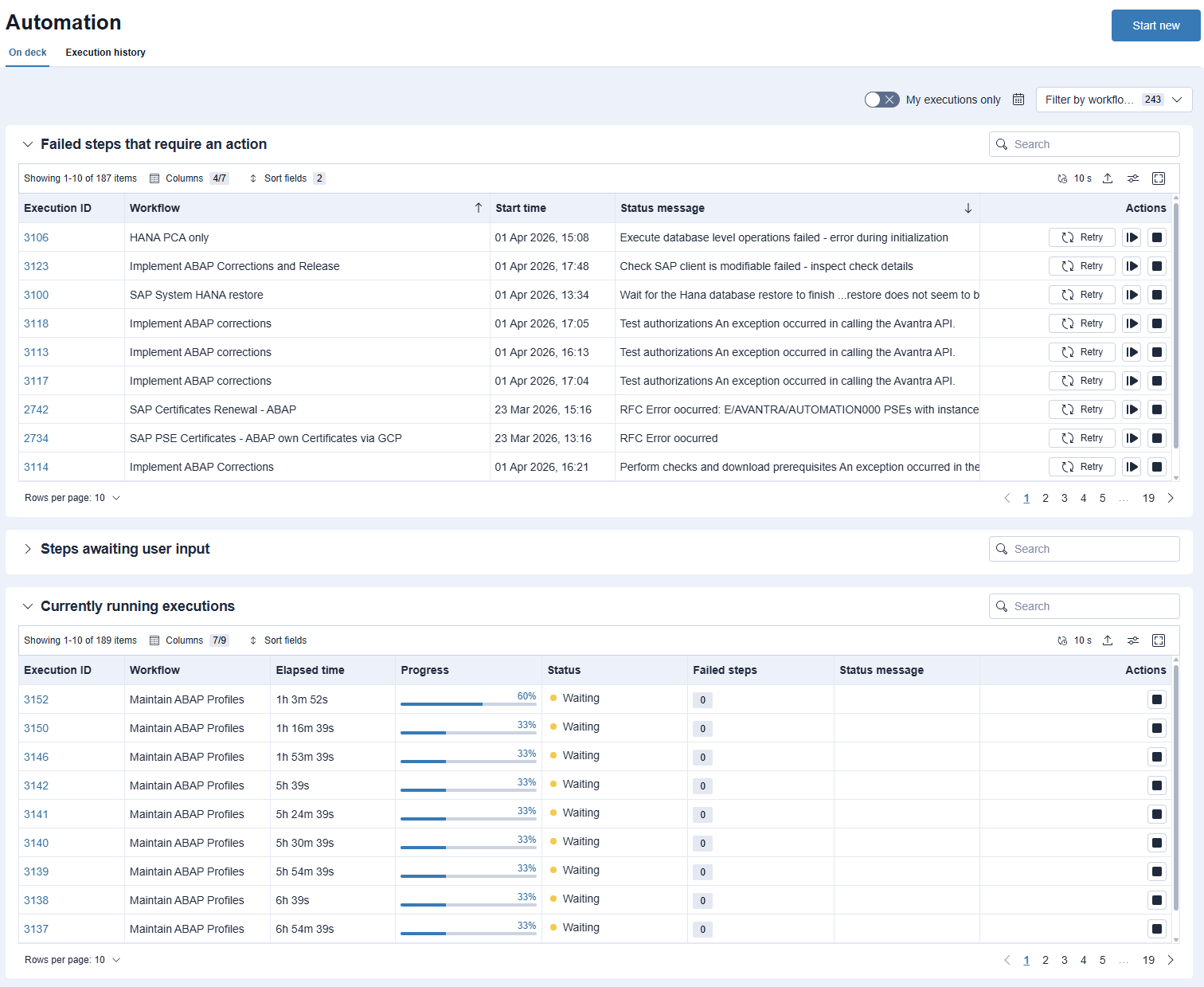
Run and oversee your workflows from one place. Avantra's new interface brings workflow execution and live monitoring together on a single Automation page, so you always know what's running, what's finished, and what needs your attention.
Start a workflow, follow its progress in real time, and jump straight to any step that has failed or is waiting on input — with the detail you need to put it right. Review the full history of past executions to confirm outcomes and troubleshoot at your own pace.
Workflow authoring, and executing workflows with variants, remain in the Classic interface — but day-to-day execution and monitoring now happen in the faster, cleaner new experience.
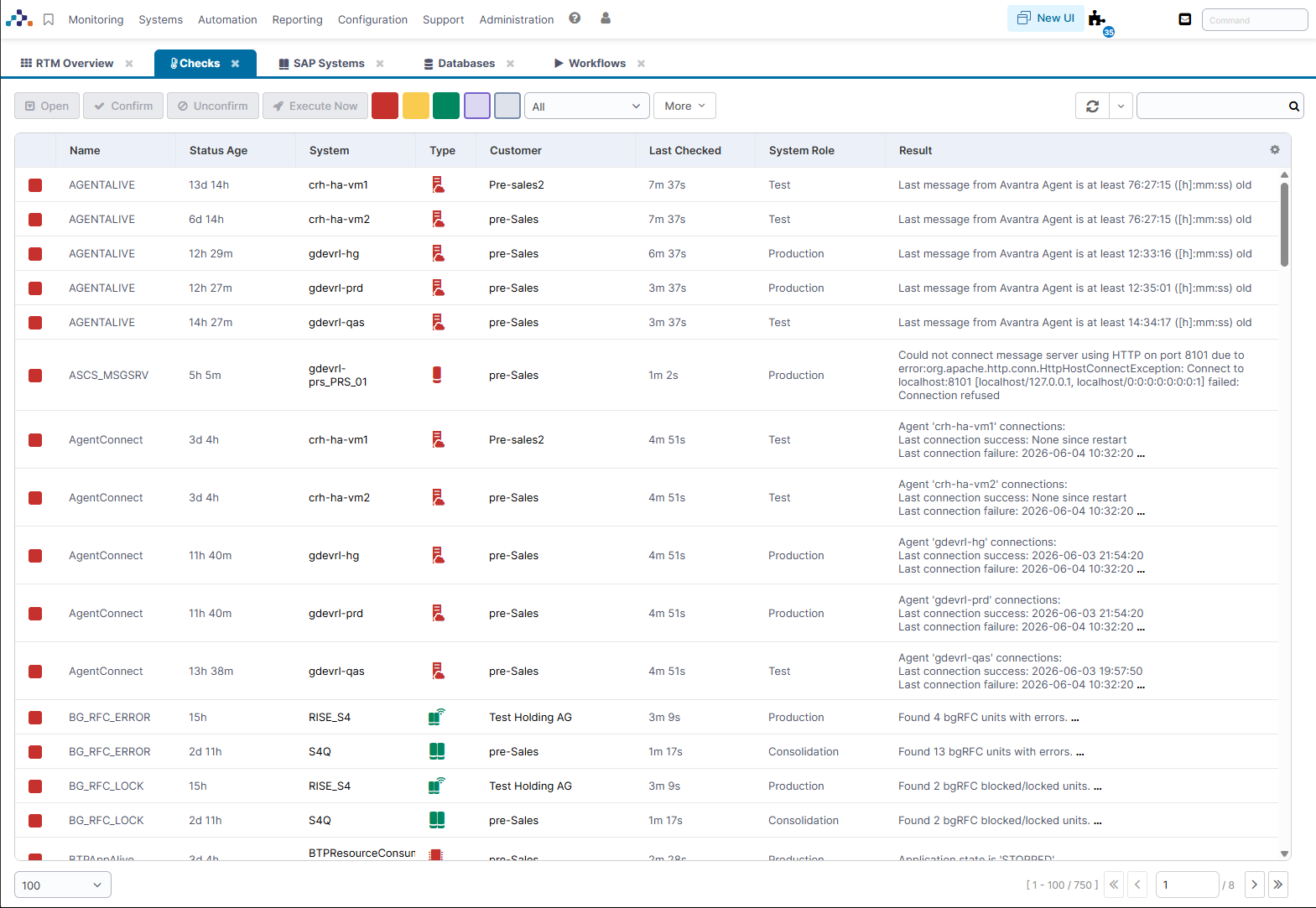
Avantra's Classic interface now shares the look and feel of the new interface. Updated colors and styling create one consistent experience as you move between the two — with nothing to configure and no change to how features work.
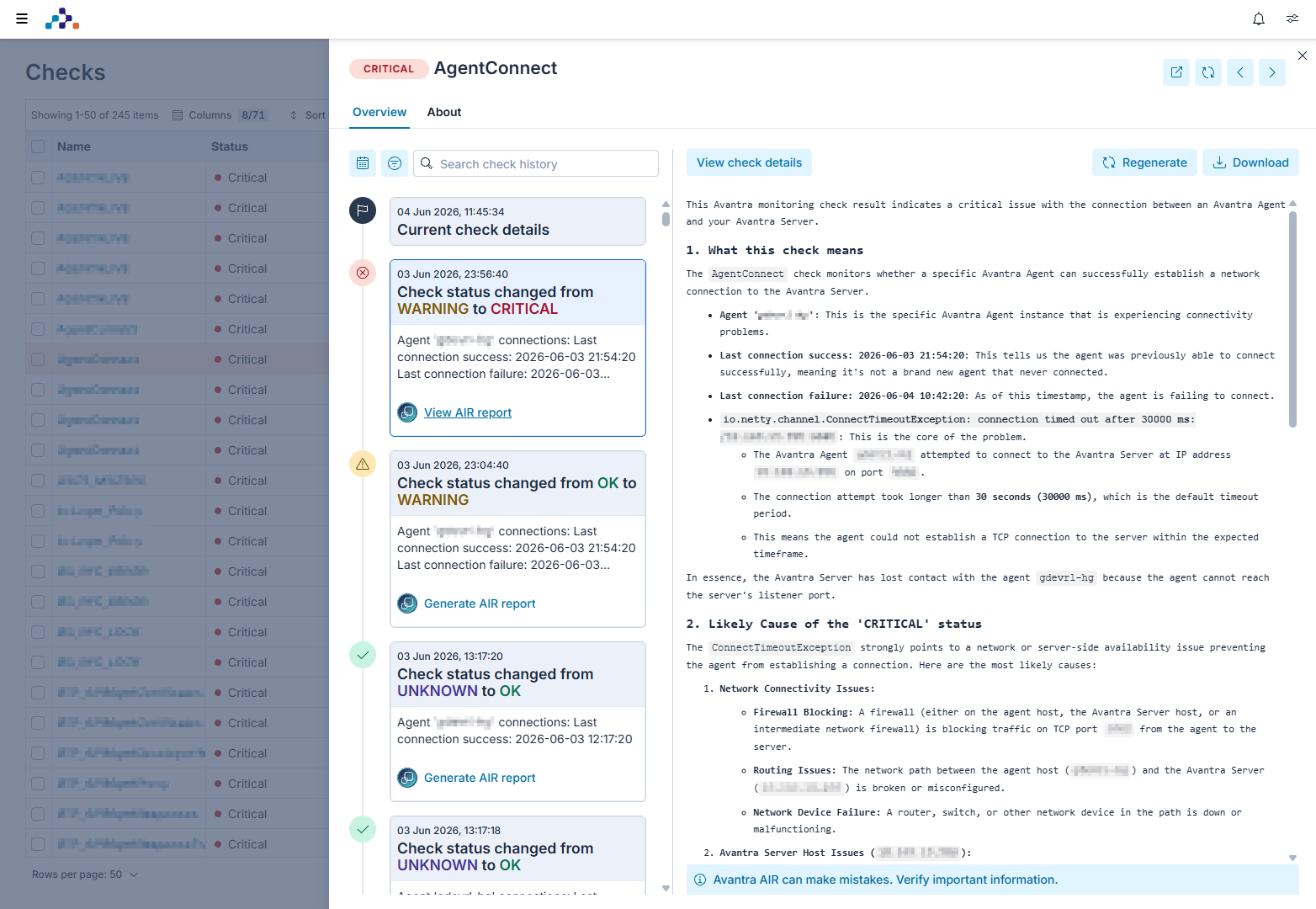
When a check turns critical, AIR Root Cause Analyzer tells you why. Now generally available, it uses AI to turn any check result into a clear, readable report that explains the likely root cause and recommends how to resolve it, so your team spends less time investigating and more time fixing.
Generate a report on demand from any check, export it to PDF to share with your team, or build root cause analysis directly into your automations with the Analyze Check with AIR workflow step. Available in both the Classic and new interface.
Every customer can try AIR Root Cause Analyzer free, with usage limits so you can evaluate the feature. A full license, available separately, comes with a much more generous fair usage policy. See the documentation to switch it on.
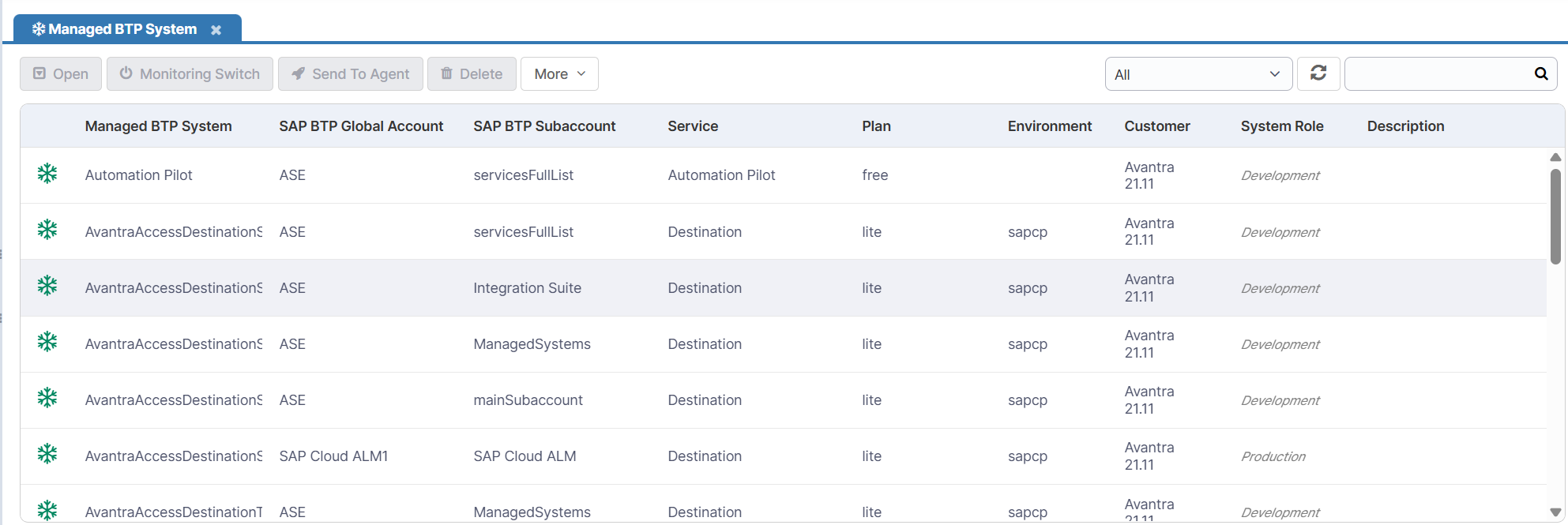
SAP BTP spans a wide and growing range of subscriptions and service instances, each with its own structure. Avantra 26 introduces BTP Managed Systems — a new way to model each one as a single, understandable object you can monitor and automate like any other system in Avantra.
Your SAP BTP Global Account remains the top of the hierarchy, with its subaccounts and Cloud Foundry applications beneath it. BTP Managed Systems now sit under each subaccount, representing the individual services and instances it runs.
BTP Managed System types are defined dynamically and ship as add-ins, separately from Avantra releases. You can add support for new BTP services as they become available without upgrading Avantra, and install only the ones you use.
Add-ins are available for a range of BTP Managed System types, including SAP Build Work Zone, Automation Pilot, Integration Suite API Management, Continuous Integration & Delivery, Destinations, Job Scheduling Service, Print Service, Event Mesh, and Cloud Transport Management.
Licensing: All SAP BTP functionality, including BTP Managed Systems, requires a point-based Avantra license and is unavailable without one. If you are on an older license model, contact Avantra to upgrade. If you already have a point-based license, you may need it updated to include the new BTP object types.
Avantra's SAP Cloud ALM (CALM) integration is now generally available, bringing your CALM monitoring into the same view as the rest of your SAP estate — with no need to switch tools.
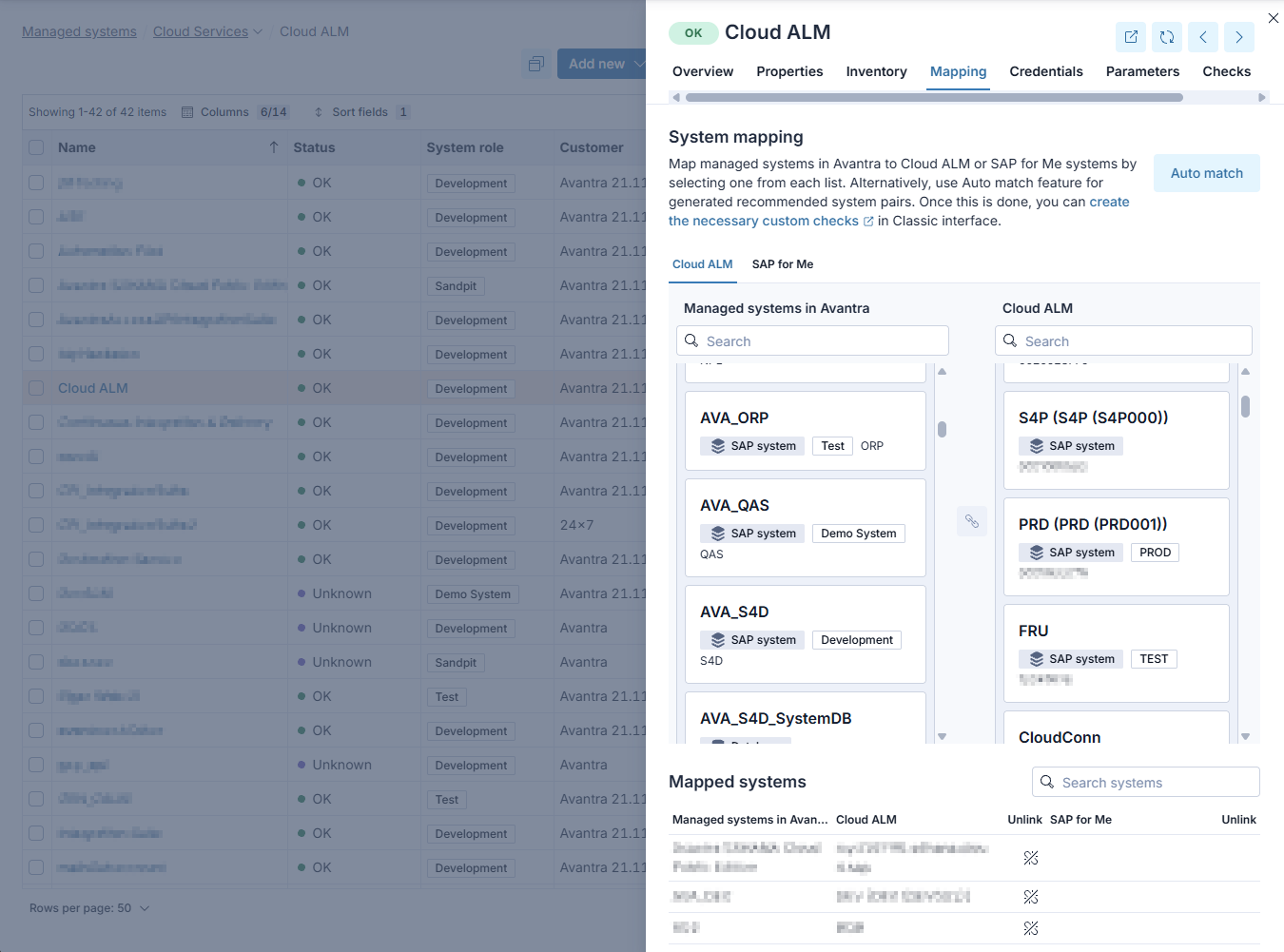
Connect your CALM tenant and map CALM systems to their Avantra counterparts, using your existing customer hierarchy to keep everything organized. CALM health metrics surface as native Avantra checks through SAP_CLOUD_ALM_HEALTH_METRICS, so you can set thresholds, alert, and automate on CALM data exactly as you would for any other check.
Additional enhancements
Added proxy support to the SAP Cloud Connector add-in.
A new Add-in for ABAP system Kernel Update to use the new automation engine for enhanced functionality and customer flexibility.
A new Add-in, SAP BTP CPI Cost Saving, is available to aid in optimization of costs when SAP charges per volume usage.
Four new automations in the Avantra transport add-in enable automated import of Avantra monitoring and automation transports into SAP ABAP systems via RFC, supporting RISE with SAP environments where direct OS access is not available, as well as via OS (tp) for traditional deployments.
The Avantra transport add-in now include MD5 checksums for each transport file, which are verified during RFC-based import to detect and report file corruption before it can affect the target SAP system.
Added support for PostgreSQL 17 and 18. PostgreSQL 13 is no longer supported.
BTP global account onboarding now supports a CIS Central View credential as a lower-privilege alternative to CIS Central, for customers who manage subaccount services manually without self-deployment.
New monitoring add-in for XSUAA.
A new Add-in, BTP Destinations, monitors all instance-level destinations configured in the SAP BTP Destination Service, by validating mandatory configuration fields, checking URL reachability for HTTP destinations, and verifying OAuth token generation for applicable authentication types.
A new Add-in, SAP BTP Event Mesh, monitors queues in the SAP BTP Event Mesh service by tracking message counts, unacknowledged messages, byte usage, and dead-message queue depth, raising alerts based on configurable thresholds.
A new Add-in, SAP BTP Automation Pilot, monitors execution history in the SAP BTP Automation Pilot service by tracking failed, suspended, and aborted executions over a configurable time window and provides detailed logs for problematic runs.
A new Add-in, SAP BTP Print Service, monitors the SAP BTP Cloud Print Manager by tracking print queue health (including missing receiver credentials and inactive queues), and monitoring QM System print document download activity from the audit log.
A new Add-in, BTP API Management, monitors the SAP BTP API Management service by tracking certificate expiry, proxy error rates, response error counts, traffic trend changes, and product configuration in the Developer Hub.
A new Add-in, SAP BTP Cloud Transport Management Service (CTMS), providing visibility into the nodes and routes structure of your transport landscape and the status of transport requests and log messages.
New built-in automations for managing SAP BTP service instances and service keys: btpCreateServiceInstanceAndKey provisions a service instance and its service key in a single operation, and btpCreateServiceKey creates a service key for an existing instance. Both automations support Cloud Foundry and SAP BTP (sapcp) environments.
Updated the Certificates add-in to use the native Avantra cryptographic API for JWT operations, and fixed an issue where leaving the pseOwnCertificateCAResponse parameter empty caused a JSON parse error.
New built-in automation for activating SAP Fiori applications, automating the identification and activation of the OData services, ICF nodes, and OData v4 services required for a given Business Role's applications.
Altered the SAP note implementation workflow to create the transport as a separate step to allow greater flexibility.
The RUN_JS database.execute() function now accepts an optional timeout argument (in seconds, defaulting to 30), and the timeoutMs property has been removed. The timeout setting is now consistent across both SAP and standalone database connections.
Added avantra.util.crypto to the RUN_JS script API, providing native cryptographic utilities including JWT signing, HMAC, and hashing — available in both agent-side and server-side scripts.
New add-in for automating Cloud Foundry spaces and quotas.
New add-in for automating SAP BTP users and role assignments, covering subaccount and Cloud Foundry access, including creating users, assigning roles from templates, and removing stale users.
New add-in for automating Cloud Foundry application lifecycle, including starting, stopping, and restarting applications at both app and subaccount level, with support for inactivity-based triggers and resource scaling.
New add-ins for automating SAP BTP subaccount entitlements, allowing you to assign entitlements directly and copy entitlements from a template subaccount.
The sharing types for dashboards have been renamed from "shared with customers" and "Global" to "Internal" and "External" respectively.
The Overview tab of managed systems now displays Cloud ALM and SAP for Me mapping information when a relationship exists, showing the linked Cloud ALM system name and SAP for Me system details including a direct link to the SAP for Me portal.
Enhanced SCI_MessageLogs custom check with new status selection functionality, alerting on missing messages and supporting spaces in key selection fields. Agents must have a minimum version of 26.6 before editing or resaving the custom check.
Updated configuration for the CALM custom check SAP_CLOUD_ALM_HEALTH_METRICS, improving usability and clarity of the configuration options.
The built-in check BTPSubAccountConnect has been renamed to BTPSubaccountConnect to match the naming conventions.
In the New UI, databases that are part of an SAP system are now displayed as read-only, with a notice directing you to edit the parent SAP system instead.
A Description column has been added to the System Selectors list view.
Improved the clarity of agent upgrade log messages during the STARTING_AGENT step, making it easier to identify which method is being used to start the agent.
The UserPWDAuditExclude monitoring parameter now supports client-specific exclusions to exclude a user from the USER_PWD_AUDIT check in a named client only. Existing plain username entries continue to work as before.
Monitoring parameter descriptions have been updated for clarity and consistency with UX copy guidelines. Threshold labels now indicate whether they apply to warning or critical thresholds where applicable.
The Service Level Reports (SLR) template has been updated so when using the check selector, the managed system type is shown for checks available across multiple system types. For example, FILESYSTEMS(Server).
The mail server configuration now supports OAuth-based authentication for outbound email, in addition to Basic Auth. Administrators can select OAuth (Authorization Code) or OAuth (Client Credentials) as the authentication type and link an existing OAuth credential from Configuration > Integrations > Credentials. Microsoft Exchange Online and Google Workspace are both supported. This ensures continued email delivery for customers affected by Microsoft's deprecation of Basic Auth for SMTP. Basic Auth remains available for backward compatibility.
New feature to configure the cross-origin-resource-sharing (CORS) settings for the GraphQL API and other web endpoints. Allowed origins are now configurable via an allowlist. Review your CORS configuration after upgrading.
The Microsoft SQL Server JDBC driver bundled with Avantra Server has been updated to mssql-jdbc 12.10.2.jre11. The updated driver enables SSL encryption by default. If you are running Avantra Server on Windows with SQL Server Express, add ;trustServerCertificate=true to the url property in .xandra\database.cfg and restart the UI and master services to avoid a "Database unavailable" error after upgrading. See Microsoft SQL Server connection encryption for information.
Proxy configuration has been consolidated into a single location. The legacy HttpProxyHost and LicenseActivationHttpProxyHost settings are now managed as named proxies under Configuration > Integration > Proxies. Existing proxy settings are migrated automatically on upgrade.
New Avantra licenses are now automatically downloaded on license activation to ensure you have access to the latest capabilities of Avantra.
The Avantra Agent installer for Windows now supports custom Windows service names, enabling two agent installations to run side-by-side on the same Windows host. The service name is also correctly passed to the updater, preventing fallback to the default service name during agent upgrades.
Added sapControl.startSystem(), sapControl.stopSystem(), sapControl.restartSystem(), sapControl.restartService(), and sapControl.getSystemInstanceList() methods to the RUN_JS script API, enabling SAP system lifecycle operations via SAP Control webmethods directly from automation scripts.
Administrators can now restart the Avantra Agent directly from the New UI. A Restart Agent action is available in the more menu on a server's managed system view, with a confirmation prompt before the action executes.
Updated integration with the Delinea external secret store, improving reliability and compatibility.
The rtmuser system setting has been removed. On upgrade, any existing value is automatically cleared. Contact Customer Support if additional information or assistance is needed.
The rich text editor used in dashboard text dashlets has been replaced with TipTap (MIT license), removing the dependency on the licensed Froala editor. All existing formatting capabilities are preserved.
Bug fixes
Fixed an issue where the SAP System HANA Client Update workflow could not be started in the HANA Database Update add-in.
Fixed an issue in the Telemetry Logs add-in where there was a syntax error when trying to call an imported osHelper.
Fixed an error in the updateHaCloudConnectorViaRpmWithFileBundle automation when using a .zip file bundle for the SAP Cloud Connector SAPJVM installation.
Fixed an issue where the SAP Cloud Connector add-in failover automation failed when using monitoring authentication credentials.
Fixed an issue where the cleanup step in the Host Agent Update Add-in failed to remove its temporary working directory.
Fixed an issue where tables listed in the additional truncate list were being truncated twice during a System Refresh workflow - once after the database restore and again after data import. Truncation now occurs only at the correct point, after the database restore.
Fixed an issue in the Avantra transport add-in where specifying clients for customising import caused a spurious validation error.
Fixed an issue in the Avantra transport add-in where specifying multiple clients for customising import via RFC caused a spurious validation error.
Fixed the transport README to correctly list which roles are included in the /AVANTRA/ALL composite role. The roles /AVANTRA/SNOTE_EXTENDED, /AVANTRA/SYSREFRESH_BIZ_CLIENT, and /AVANTRA/TRANSPORT are not part of the composite role and have been removed from the documentation.
Fixed an issue where testing a step can run into a timeout in some scenarios.
Fixed an issue where system-type inputs passed to a JavaScript step in a start dialog wizard were received as empty strings instead of the expected system ID.
Fixed an issue where the Avantra UI emitted no log output when the database was unavailable during startup, making upgrade failures difficult to diagnose. Database connection errors are now logged to xangui.log.
Fixed an issue where the default value for Status inputs in Classic UI workflow configurations was not saved correctly.
Fixed an issue where when using a workflow JS step that calls all servers during a start dialog execution with a specific customer selected, the results were not filtered by that customer, returning all servers across all customers instead.
Fixed an issue where testing an Agent JS step script that used a Credentials parameter failed if the step had not been saved by clicking Apply first.
The RFCCONNECT check now displays "Running with legacy SAP integration" on SAP systems using the MONXAN4 transport, replacing a misleading "not found" message.
Fixed the NumRangesUseObjectDef monitoring parameter to correctly interpret percentage warning thresholds in line with SAP Note 2292041, alerting when the used percentage meets or exceeds 100 - value rather than value. Review your existing threshold configurations after upgrading.
Fixed an issue where SAP system parameter values containing # characters (such as FN_AUDIT) were truncated in the Avantra UI, causing changes to the portion after # to go undetected.
Fixed an issue where the TH_WPINFO RFC function returned CPU time in an invalid format, causing work process CPU time to display as a raw value instead of hh:mm:ss.
Fixed an issue where the NETWORK_IO check would cause an NaN value to be shown in the logs.
Fixed an issue where the SAPBufferSummary daily check ran at the SAP System level, causing only primary instance data to be collected. The check now executes at the SAP Instance level, ensuring all monitored instances are included.
Fixed an issue where the Deputy field in Server Properties failed to save on a second consecutive update, leaving the modal open with the change unpersisted.
Fixed an issue where BTPDestinationTrustSaml2MetadataCertificate check doesn't handle subaccounts without a trust certificate.
Fixed an issue with BTP entitlement detection on directories.
Fixed an issue where wildcard patterns used to exclude process chains from the BW_PROCESSCHAIN check were not applied correctly, causing excluded chains to still appear in the check output.
Fixed an issue where Java monitoring, using the P4 mode, doesn't work after updating to Java 21.
Fixed an Oracle cursor leak in the ORASegmentsMaxExt collector that caused the Avantra monitoring user to exhaust OPEN_CURSORS over time, resulting in ORA-01000: maximum open cursors exceeded errors and failure of all Oracle collectors on the affected instance message.
Fixed an issue with FILE_SYSTEM collection aborting on Windows due to transient $RECYCLE.BIN path in NTFS mounts.
Fixed an issue where SLT_Status incorrectly reports RC=4 as CRITICAL instead of WARNING.
Fixed an issue with BO_Processes where the parent PID was incorrectly shown as -1 in some scenarios.
Fixed an issue where forced check cycles skipped FILE_SYSTEM data collection on the server context, causing ORA_DATAFILES, MSS_DBUSAGE, and MSS_LOGUSAGE checks to report CRITICAL with "FILE_SYSTEM data could not be collected" when checks were triggered via Check Now.
Fixed an issue where changing the customer assigned to a SAP system via the GraphQL API did not update the customer reference on the underlying monitored system record.
Fixed an issue where the ORA_ALERTLOG check threw a NullPointerException when ORA_PARAMETERS collector data was unavailable, such as during forced cycles.
Fixed an issue where SAP S/4HANA Cloud Public Edition systems with more than 100 Business Users could not be brought into monitoring, failing with an HTTP 403 error on paginated OData responses.
Fixed an issue where BCS_OutBoundErrStat check was not updated in future check runs in some scenarios.
Fixed an issue where SAP BusinessObjects BO_SERVERS and BO_JobStat checks intermittently failed with "404 - Not Found" after successful login.
Fixed an issue with MSS_DBUSAGE and MSS_LOGUSAGE checks that were CRITICAL after upgrading to 25.3.2.
Fixed an issue where SAP notes of an SAP system are not processed with FULL cycles after upgrading to 25.3.2.
Fixed an issue where the BTP Usage Data Management Service was not deployed when the main monitoring subaccount is under a self-managed directory.
CSV: Fixed an issue where SAP instances were recorded as not seen if timeouts occurred on SAP system checks.
Fixed an issue where, in some SAP versions, the SAPSpoolConsistency check deleted inconsistent spool objects rather than listing them. The check now correctly runs in list-only mode on all supported SAP releases.
Fixed an issue where in some scenarios ABAP checks were not executed when a check cycle is forced.
Fixed an issue where database operations could not be performed if the database was monitored on a different agent to the SAP system primary instance.
The character limit for URLs on notification output channels has been increased beyond the previous 255-character limit, accommodating longer URLs such as those used by Microsoft Teams Workflow webhooks.
Fixed an issue where global macros used inside compound AND/OR expressions in notifier filter lists were not resolved, causing filter evaluation to fail silently.
Fixed an issue where sending of an email notification fails if an output channel has both a user recipient and a raw email recipient.
Fixed an issue where the Avantra Agent installer failed on Linux systems where the home directory was mounted with the noexec option, as required by some security hardening guidelines.
Fixed an issue in the New UI where credential fields on the Credentials tab of a managed system could not be edited, even when the user had the appropriate permissions.
Fixed an issue where deleting a check property wrote an unreadable Java object reference to the logbook instead of a meaningful description.
Fixed an issue where Cloud Services were not available as a system type when using ad hoc System Selectors.
Fixed an issue with timeouts during connect can cause the agent to block check collection.
Fixed an issue that could cause repeated daily checks to be calculated.
Fixed an issue where, when in the Classic UI, moving between the Membership and Passkeys tabs of User Management threw an exception.
Fixed an issue where the customer filter set on a System Selector was ignored when using that selector for Agent, Java, or Kernel upgrade operations.
Fixed an issue where changing the session timeout for a user in user management incorrectly applied the change to the current session rather than saving it to the target user's settings.
Fixed an issue where the turnMonitoringOn and turnMonitoringOff GraphQL mutations returned stale monitorOff state in the response, requiring API consumers to wait for the async cache refresh before querying accurate data.
Fixed an issue where JavaScript executions were not releasing used memory in some scenarios causing OutOfMemory exceptions.
Fixed an issue where an agent update would fail if that agent was connected through a gateway in some scenarios.
Fixed an issue where Avantra was unable to communicate with Avantra Agents running on non-standard ports.
Fixed an issue where custom credential purposes were not shown for Cloud Services/BTP.
Fixed an issue where SAP system monitoring could fail after system restart and required an Avantra Agent restart.
Upgrading a Agent Java version to 17 or above removed --add-opens on Windows which caused issues with Agent database connectivity.
Fixed an exception shown when custom checks are filtered by check type.
Fixed an issue where the GIT repository integration would break if no remote tracking was available for the current branch.
Fixed an error that could occur when importing custom checks when check templates are used.
Fixed an issue where the timeout of the users' session could be shorter than the configured value (either default or user specific).
Fixed an issue where users with appropriate permissions could not edit the shared customer on a dashboard copied from another user.
Fixed multiple issues with the image dashlet on dashboards, including uploaded images being incorrectly deleted during maintenance when a dashboard contained more than one image dashlet.
Fixed an issue where the dashboard sharing token was hidden from the URL and refreshing the page forced a login.
Fixed an issue in the New UI where creating a system selector in the Managed Systems list did not filter the list when a customer was selected.
Fixed an issue in the New UI where changing column visibility caused the column list to reorder unexpectedly in table settings.
Fixed an issue where the extended check result portal UI appeared in the wrong location.
Saving the Operational Since and Until dates in the new UI could be offset by a day if the user was located in a non-UTC timezone.
Deprecations
Known issues
JavaScript commands fail on PowerPC (ppc64le) agents
JavaScript-based commands, including RUN_JS custom checks, JavaScript automation steps, and any other commands that use the JavaScript engine, fail on Avantra Agents running on PowerPC 64-bit Little Endian (ppc64le) architecture.
The failure is caused by the GraalVM Polyglot runtime bundled with Avantra, which does not include native support for the ppc64le platform.
Workaround: Fallback to Agent to 25.3.x.
For more information, see the Avantra solution document Avantra 26 - Known Issues.
Upgrading to Avantra 26
Avantra 26 changes the required Java runtimes and includes several configuration and API changes. Work through the steps below in order: prepare your environment, upgrade the server, upgrade your agents, then complete the post-upgrade tasks.
Avantra 26 needs new Java runtimes: Java 25 for the Avantra Server and Java 21 for Avantra Agents. Upgrade the runtime before you upgrade each component. The supported upgrade paths are in the server and agent steps below.
Test the upgrade on a development or test Avantra system before you roll it out to production. This avoids unnecessary downtime and lets you validate your custom code and configuration changes in advance. Free development system licenses are available — contact Avantra Support.
Before you upgrade
- Take VM and database backups. Capture VM snapshots and a database backup before you start. Many Avantra Server upgrades change the database structure, which prevents an in-place downgrade — a database restore is the only way back, and a verified backup is your responsibility.
- Read the release notes and Upgrade Notes. When you upgrade across several versions at once, also read the notes for every version you skip.
- Check and, if needed, upgrade PostgreSQL. PostgreSQL 13 is no longer supported, and PostgreSQL 14 is the minimum. To stay on a supported PostgreSQL release for longer, we recommend PostgreSQL 15 or 16 as a practical minimum, and ideally 17 or 18, which Avantra 26 is validated against. See the PostgreSQL versioning policy for end-of-life dates, and follow the Upgrading a PostgreSQL Cluster procedure for your platform. After upgrading, stop, disable, and remove the old PostgreSQL version: if it is left in place, it can start first after a reboot and claim the port before the new version, so Avantra connects to the old database and silently serves out-of-date data. Confirm that the upgraded version is the one answering on the port in your Avantra
database.cfg, for example by runningSELECT version();against it. - Review custom code and references affected by API changes. Check your
RUN_JScustom checks, automation steps, and script notification channels:- Legacy HTTP client API (removed in 26). Rewrite any web service calls that use the legacy HTTP client to use the current
webHTTP client API. You can do this before upgrading, as thewebAPI has been available since 21.11. See Migrating from the legacy HTTP API to the Web API. database.execute()timeout (changed in 26). Search for thetimeoutMsproperty, but do not change it yet. The replacement timeout argument exists only in Avantra 26, so apply the code change once the agents that run these scripts are on 26 — see After you upgrade.BTPSubAccountConnectcheck (renamed in 26). Note whereBTPSubAccountConnectis referenced in selectors, notification filters, custom checks, and scripts. Verify these after upgrading — see After you upgrade.
- Legacy HTTP client API (removed in 26). Rewrite any web service calls that use the legacy HTTP client to use the current
- Check that seldom-used accounts can still log in. Avantra 26 removes support for MD5 password hashes, so a user whose password is still stored as an MD5 hash cannot log in after the upgrade. Avantra upgrades a password hash automatically the next time that user logs in, but an account that has not logged in for a long time — such as a failsafe admin account — may still use the old hash. Log in with these accounts before upgrading to force the hash upgrade. If an account is locked out after upgrading, reset its password from an administrator account that can still log in.
- Windows only: install a valid Microsoft SQL Server certificate if required. The updated SQL Server JDBC driver enables SSL encryption by default, so the Avantra Server must trust the certificate your SQL Server presents. If your SQL Server uses a self-signed or untrusted certificate (common with SQL Server Express), configure encryption with a valid certificate before upgrading; see Microsoft's Configure SQL Server encryption guide. If you hit a database connection error during the upgrade, apply the workaround in Server upgrade.
Server upgrade
- Confirm Java 25 is installed. The Avantra Server runs on Java 25 only. If you are upgrading from a version older than 25, upgrade Java to 25 first.
- Run the server upgrade installer. Follow the Linux or Windows steps in Upgrading Avantra Server.
- Apply the required configuration changes:
- CORS allowlist. The GraphQL API and other web endpoints now accept requests only from origins on an allowlist. Review your cross-origin resource sharing (CORS) configuration so trusted applications keep working. Follow this entry in our hardening guide.
- Proxy configuration. The legacy
HttpProxyHostandLicenseActivationHttpProxyHostsettings are migrated automatically to named proxies under Configuration > Integration > Proxies. Confirm the migrated entries are correct.
- Log in as an administrator to complete the upgrade. After the installer finishes, log in to the Avantra UI with an administrator account to trigger the database migrations. These can take some time on larger installations, and the UI responds more slowly until they finish. Non-administrator logins may fail until the migrations complete.
If the server reports a database connection error (for example, "Database unavailable") after upgrading, the updated JDBC driver could not establish an encrypted connection to Microsoft SQL Server. Edit the url property in .xandra\database.cfg, then restart the UI and master services:
- If your SQL Server presents a self-signed or untrusted certificate, add
;trustServerCertificate=true. - If your SQL Server is not configured for encryption at all, also add
;encrypt=false. On a non-encrypted instance,trustServerCertificate=truealone is not enough, because the driver still attempts to encrypt the connection.
For a non-encrypted SQL Server, the full url looks like this:
url=jdbc\:sqlserver\://<sql-host>\:1433;databaseName\=<database>;encrypt=false;trustServerCertificate=true
The recommended fix is to configure encryption on your SQL Server with a valid certificate rather than disabling it. See Microsoft's Configure SQL Server encryption guide, and install a valid certificate before upgrading (see Before you upgrade).
If you are upgrading from a version earlier than Avantra 25, you may need to upgrade in stages so the database migrations apply successfully. Contact Avantra Support for guidance.
Agent upgrade
Avantra Server 26 is compatible with all supported Avantra Agent versions, so you can upgrade your agents after the server is live. Upgrade agents to 26 to use the latest features — older agents cannot use new 26 capabilities and APIs.
Avantra Agents on version 26 run on Java 21 only, and versions up to 25.2 do not support Java 21. Avantra 25.3 is the only version that supports both Java 17 and Java 21, so use it as the stepping stone:
- Upgrade agents to Avantra 25.3 on Java 17.
- Upgrade the Java runtime from 17 to 21.
- Upgrade the agents to Avantra 26.
You can perform each step manually or with the built-in automatic agent and Java updates, which is the recommended approach. For the detailed path, see Upgrading to Java 21.
If an Avantra Agent monitors SAP systems, upgrade the SAP transport before you upgrade the agent, because of a caching mechanism in the agent. In Avantra 26, the Avantra transport add-in can import the monitoring and automation transports for you — via RFC (including RISE with SAP environments without direct OS access) or via OS (tp). See Upgrading Avantra SAP transports.
After you upgrade
- Apply the
database.execute()timeout change. Once the agents that run yourRUN_JSdatabase custom checks and automation steps are on Avantra 26, replace the removedtimeoutMsproperty with the new timeout argument (in seconds, default 30). The timeout then behaves the same for SAP and standalone database connections. See Making database queries. - Verify references to the renamed
BTPSubaccountConnectcheck. Confirm that any selectors, notification filters, custom checks, and scripts that referenced the oldBTPSubAccountConnectname still work after the rename, and update any that do not. - Review affected monitoring thresholds. The NumRangesUseObjectDef parameter now interprets percentage warning thresholds correctly, in line with SAP Note 2292041. Review your existing threshold configurations so alerts fire as you expect.
- Consider moving outbound email to OAuth. Mail server configuration now supports OAuth for Microsoft Exchange Online and Google Workspace. Basic Auth still works, but Microsoft is deprecating it for SMTP — switch to OAuth to keep email flowing. See Email integration.
For full, command-level upgrade instructions, see Upgrading Avantra.